Step 1:
First check that you are using the correct domain: https://manage.betterfleet.com.
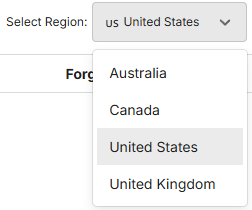
Check that you have selected the correct region for your account,
Step 2:
If this is accurate reset your password using the Forgot Password button
Follow the prompts and check inbox (and spam/junk folder) for the reset email.
Reset links will expire after a certain time period. If expired, repeat the process.
Step 3:
If the problem persists, contact your organisation's BetterFleet system admin.
Step 4:
If the issue still requires further attention after these steps, please escalate this issue by providing further details with your browser name, browser version and screenshots of any error messages you are seeing.
Was this article helpful?
That’s Great!
Thank you for your feedback
Sorry! We couldn't be helpful
Thank you for your feedback
Feedback sent
We appreciate your effort and will try to fix the article