Charger Troubleshooting Guide

Created by Brad Atkinson, Modified on Mon, 2 Jun at 1:59 PM by Brad Atkinson

Quick Guide – Charger Fault Troubleshooting Guide
Charger
Action
Identify
Check! 1) Is the charger powered on 2) Is the bus 100%? 3) Is there a known fault for this bus/charger?
  • (Follow any instructions on charger screen), disconnect plug(s) from bus, restart charge session
  • If fault re-occurs, check each port/plug combinations to see if single gun charging is possible
  • If fault re-occurs, try the bus on another charger. If charging is successful, check the charger works with a different bus. Report ALL faults to Maintenance and Operations Managers daily
BetterFleet
Action (see screenshots below)


Identify
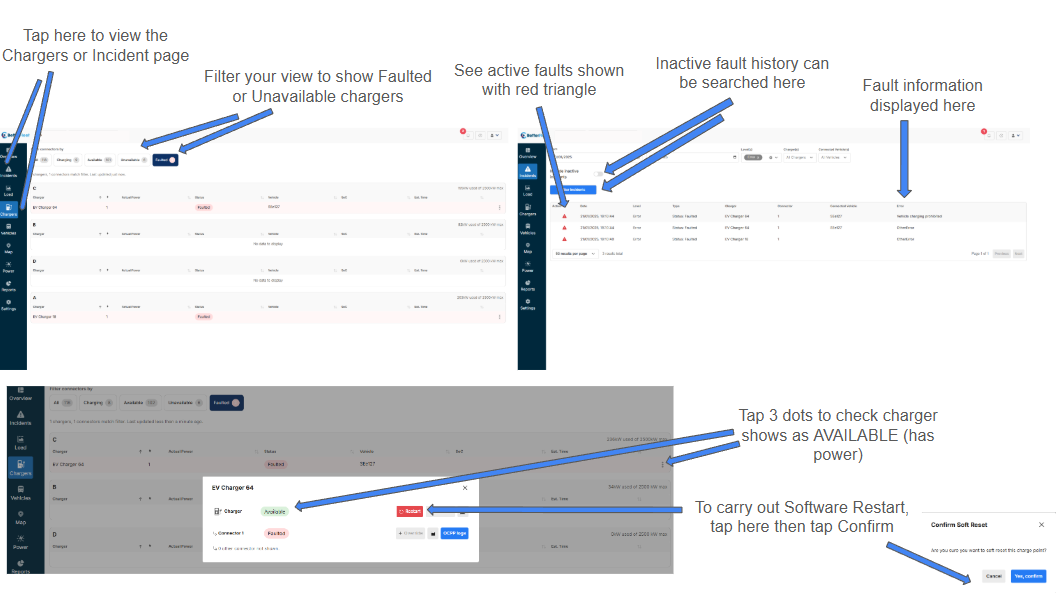
If you see a charger status displaying Unavailable (probably via Unavailable filter on the Chargers page):
  • Check if the charger is powered on, if yes then report to BetterFleet Customer Success Manager
If you see a charger Fault (via the Faulted filter on the Chargers page), then go to the Incident page and review the active fault Error information (red triangle)
  • If BetterFleet displays a charger fault but there is no bus plugged in, follow Software Restart steps
  • If fault is Active, visit charger, disconnect plug(s) from bus, restart charge session
  • If fault re-occurs, check each port/plug combinations to see if single gun charging is possible
  • If fault re-occurs, try the bus on another charger. If charging is successful, check the charger works with a different bus. Report ALL faults to Maintenance and Operations Managers daily
Software Restart
Go to the Chargers page, tap on 3 dots on(right-hand side of the faulted charger). If the charger shows Available in green, tap Restart and Confirm. Wait 60s, check the fault is no longer Active in BetterFleet


Was this article helpful?

That’s Great!

Thank you for your feedback

Sorry! We couldn't be helpful

Thank you for your feedback

Let us know how can we improve this article!

Select at least one of the reasons
CAPTCHA verification is required.

Feedback sent

We appreciate your effort and will try to fix the article