How to View Live Charging Activity in BetterFleet

Created by Brad Atkinson, Modified on Mon, 2 Jun at 1:54 PM by Brad Atkinson


Quick Guide – How to view Charging Activity
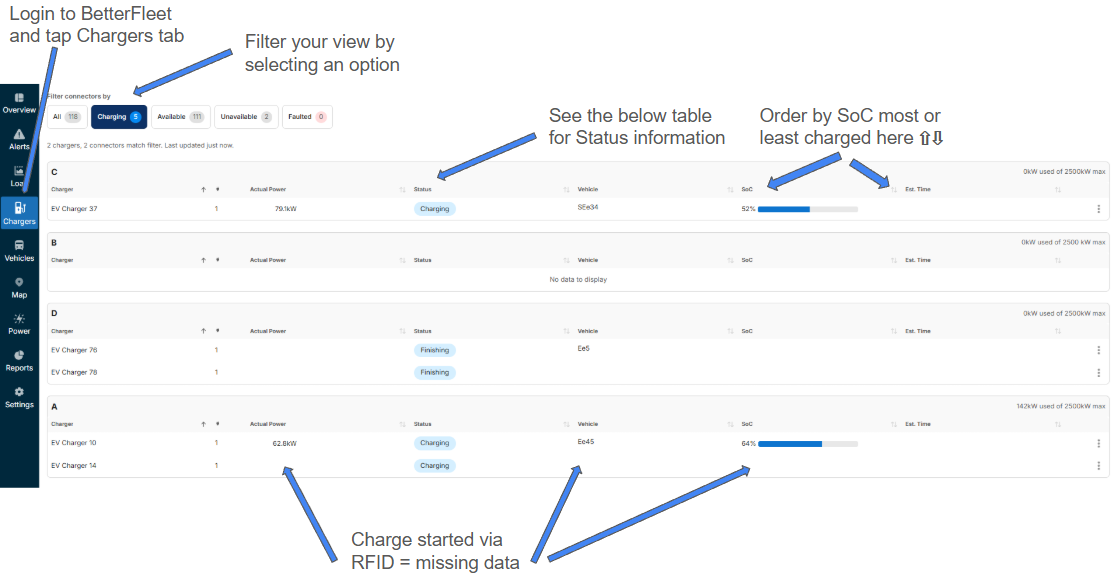


Charge Status

Description/Action

Preparing

A charging session has been initiated

Charging

A charging session is currently ongoing

Finishing

Charging has finished or has been manually stopped on the charger (check SoC)

Suspended EV

Charging has been completed (check SoC) or temporarily paused by load management

Charging Error/Error

View Alerts tab to identify error (i.e. hot plug, faulty socket etc), take action if needed and then restart session

Unavailable

No connectivity to the charger, try a remote restart through the BetterFleet interface

Offline

No connectivity to the charger, raise with EVenergi Customer Success Manager


Was this article helpful?

That’s Great!

Thank you for your feedback

Sorry! We couldn't be helpful

Thank you for your feedback

Let us know how can we improve this article!

Select at least one of the reasons
CAPTCHA verification is required.

Feedback sent

We appreciate your effort and will try to fix the article